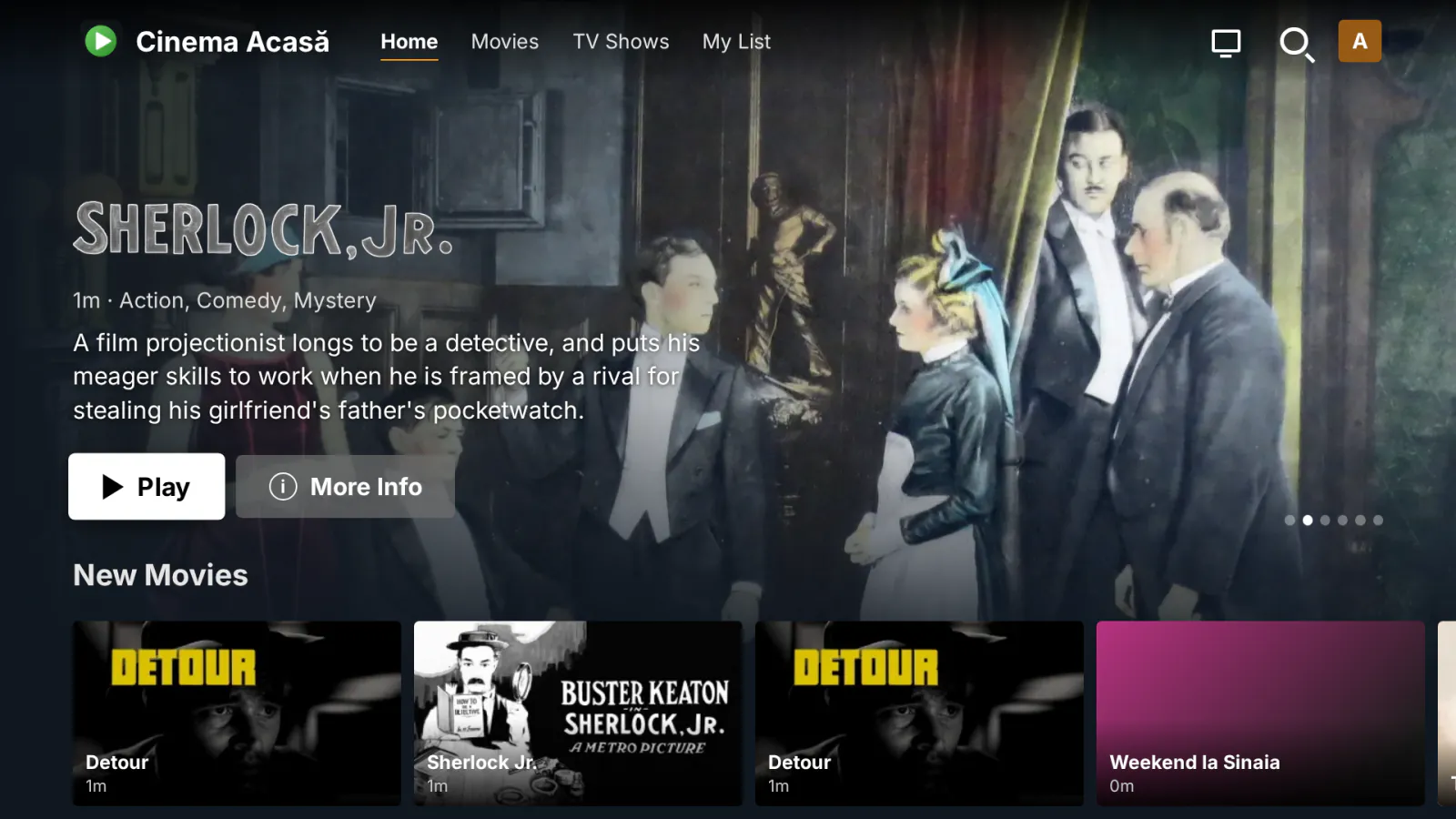
MediaLab TV is the app for the TVs in your house, or your users' houses, that have no Emby app: older Philips, LG or Samsung models, and any TV with a web browser. Open its address once in the TV browser, save it as a favorite, and from then on the TV signs in by itself and opens a Netflix-style interface made for the remote. It carries your name, logo, colors and address, not ours.
What it does
- Opens in the TV browser and works with the remote. A TV mode is chosen by itself on Tizen, webOS, Android TV, Google TV and Philips TVs (or switched from the profile menu): sized for 720p, 1080p and 4K screens, with safe margins and a large focus. Arrows, OK, Back (with a question before leaving), the media, color, channel and number keys work, and so does the LG Magic Remote pointer.
- Its own interface: a rotating banner and rows for Continue Watching, Next Up, recently added movies and series, each library, My List, collections, genres and live TV (on now, movies tonight, sports, kids, coming up); title pages with backdrop, ratings, cast, seasons and episodes, similar titles and the local trailer; grids for movies, series, genres and actors; search with an on-screen keyboard; profiles ("Who's watching?").
- Its own player: audio tracks, subtitles, resume, next episode, and the Skip intro / recap / credits buttons (Emby's markers and Smart Skip). Playback is reported to Emby, so it shows in Continue Watching everywhere. With the setting "After sign-in, open" you can send users to Emby Web instead.
- Full screen: a header button (where the browser allows it) and the F key; on a TV, or when opened from Quick Connect, the first OK / click switches to full screen (since 1.2.1).
- Signs in by itself with the account remembered on the TV.
- "Sign in with your phone", when the Quick Connect plugin is installed and on: the TV shows a code and a QR code, you approve on the phone.
- "New account (from the phone)", with Registration: the TV shows a QR code, the person signs up on the phone and the TV signs in once the account is active. With Cashier, payment is made from the phone too, by QR code.
- Your branding, set in the plugin panel: the app name, the short name shown in the server's device list, a line under the name (for example your website), the footer, the accent and background colors, the language (automatic from the TV, English or Romanian) and your logo (PNG or SVG). A preview shows the result before you save.
- Your own address: besides
/emby/MediaLabTv/, a short path such as/web/tv/index.html(the default). Emby serves only files under/web/, so the short address ends inindex.html. The plugin puts a small redirect page there and puts it back by itself after Emby updates. - Without a valid license, TVs see only a neutral "Service unavailable" screen, in English and Romanian, without your name or logo.
Limits
- MediaLab TV is not an app from the TV's app store: it is a web app opened in the TV browser. What a TV can play depends on its browser; the server transcodes what the browser cannot play.
- On package installs (Linux), Emby's web files belong to root, so the plugin cannot write the redirect page itself. The plugin panel then shows the exact command to run once on the server, and again after each Emby update. The address
/emby/MediaLabTv/always works, without any command. - Sign-in with the phone needs the Quick Connect plugin; new accounts need Registration; payment needs Cashier. Without them, the TV shows only the usual username and password sign-in.
- It has been tested in an emulated Philips TV browser; other TV brands are handled in the code but not yet tested on real TVs.
What it sends where
- The TV talks only to your Emby server: pages, images and data all come from it, and the page blocks anything from elsewhere (no web fonts, no CDN, no outside trailers). The QR codes come from the MediaLab plugins on the same server.
- On the TV (the browser's storage): the server's sign-in token, the user name, the device id and the chosen profiles, not the password. The token is checked at every start; if it was revoked, the TV shows the sign-in form. The setting "Remember the password on TVs" (off by default) keeps the password only for TVs that keep losing the token. A password saved by version 1.1 is used once, if needed, then deleted.
- On the server: the branding settings and the logo, and the redirect page under
/web/. - To medialab.works: only the license check. The payment QR code on the plugin's License page is generated locally, in the page (since 1.2.1); the payment link is not sent to any third-party QR service.
Full details for every product, including what stays on your server: Licensing, privacy and compatibility.
Client compatibility
- MediaLab TV is itself the client: a web app for TV browsers, with its own interface and player. Tested in an emulated Philips TV browser.
- Not tested yet on real TVs: Samsung (Tizen), LG (webOS), Android TV / Google TV and real Philips sets are handled in the code (TV mode, remote keys, Magic Remote pointer), but not checked on the devices.
- What a TV can play depends on its browser; the server transcodes what the browser cannot play.
- The phone side (sign-in with the phone, new account, payment) runs in the phone's browser, on the pages of Quick Connect, Registration and Cashier.
Requirements
- Emby Server 4.10.1 or newer.
- A TV with a web browser.
- Optional: Quick Connect, Registration, Cashier and Smart Skip.
Licensing
One license per Emby server. Monthly, yearly or lifetime, or included in the Emby bundle. Free 30-day trial. The plugin is licensed under our EULA.
MediaLab TV is our own code, written from scratch by MediaLab Works; it contains no third-party code. The player uses the hls.js that comes with Emby Web, which the plugin does not ship, and the QR codes come from the Registration, Cashier and Quick Connect plugins.