mailcow-dockerized keeps one session per host name. When an admin clicks SOGo next to a mailbox, that same session switches to the mailbox: SOGo opens, but the admin is no longer signed in to the admin UI, and while the admin session is open SOGo sends you back to the admin dashboard. Updating mailcow means an SSH session and update.sh. Every new mail domain needs its MX, SPF, DKIM and DMARC records, set by hand at the DNS provider. mailcow Toolkit fixes all three, inside your own mailcow, and keeps working after mailcow updates.
What it does
SOGo as any mailbox, keeping the admin session
- The SOGo button in the mailbox list (for the platform admin only; domain admins keep mailcow's own button) opens SOGo as that mailbox, in a new tab. Your admin tab stays signed in.
- SOGo runs on a separate webmail host name (for example
webmail.example.com), so it has its own session cookie, apart from the admin UI. - The hand-off uses a one-time token, valid 60 seconds and used once. On the webmail host a fresh mailbox session is started; it never inherits the admin role.
- It uses mailcow's own rules: it needs
ALLOW_ADMIN_EMAIL_LOGIN=yand the Login as mailbox user permission, and inactive mailboxes are refused. - Every use is logged: in mailcow's login log of that mailbox (as an SSO login) and in the Toolkit audit log, with who opened it and from which address.
- Without a webmail host name, the button keeps mailcow's stock behavior.
Update mailcow from the admin UI
- A new page, System > Updates (Toolkit), shows the installed mailcow version, the last check and the new changes.
- The server checks for a new mailcow version every day and sends one e-mail per new version to the address you set on the page.
- Update now first takes a backup (crypt, redis, rspamd, postfix and mysql, kept 14 days), then runs mailcow's own
update.sh, then waits until every container is running and the UI answers. The log is shown live on the page. - If the backup fails, the update is stopped and nothing is changed. If
update.shfails or a container does not start, the page says so and keeps the log. - The page follows the language of the mailcow UI: English or Romanian.
DNS records and Cloudflare
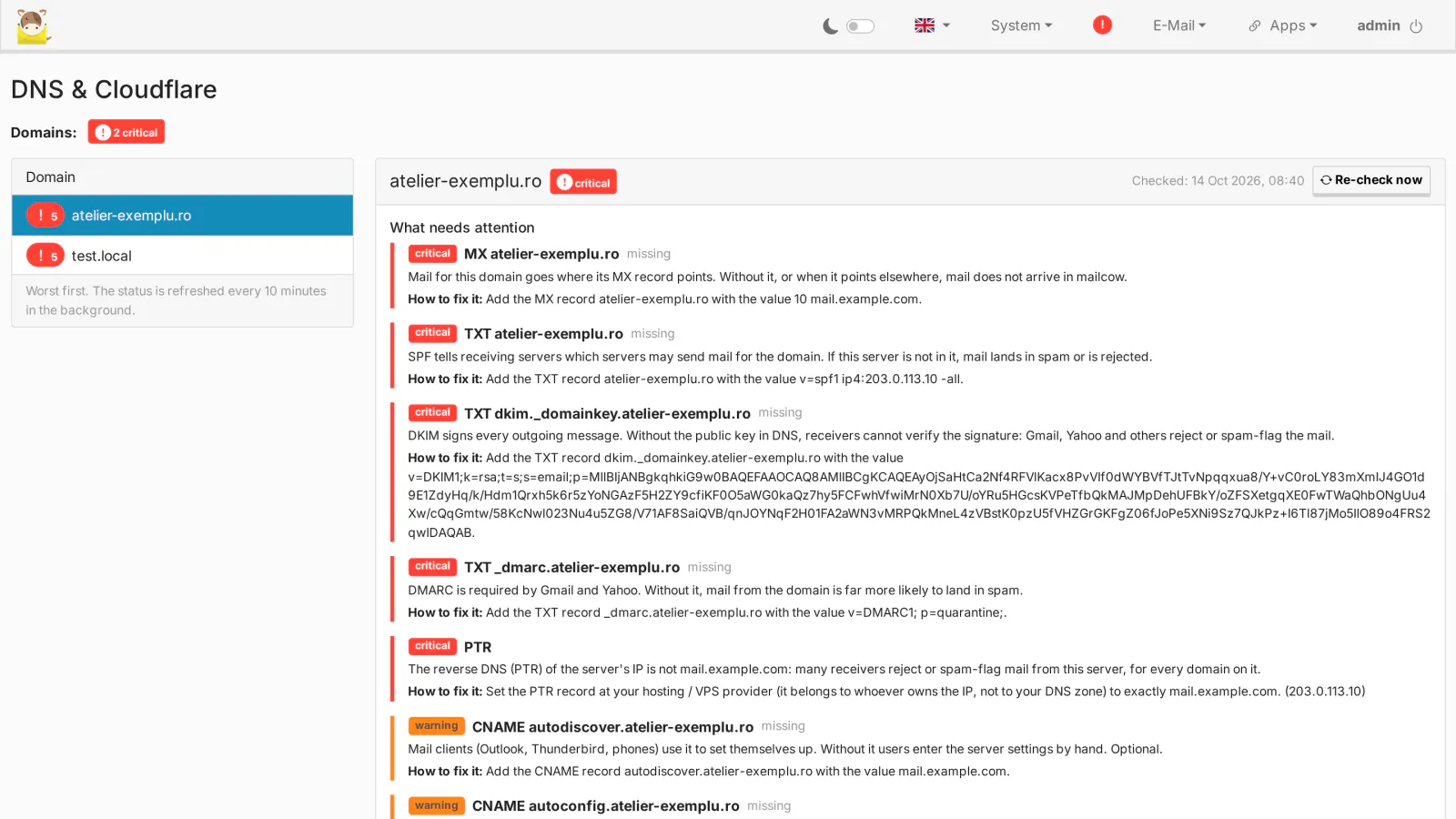
New in 0.3.0: the page System > DNS & Cloudflare (admins only) lists, for every mailcow domain and alias domain, the records mailcow needs, following mailcow's own DNS check:
- Required: the A record of
MAILCOW_HOSTNAME(DNS-only in Cloudflare; listed for the domain whose zone holds the host name), MX 10 toMAILCOW_HOSTNAME, SPF, DKIM (mailcow's selector and key) and DMARC. - Recommended: the
autodiscoverandautoconfigCNAMEs (DNS-only), the SRV records for autodiscover, IMAPS, submission and SMTPS, POP3S (when POP3 is allowed), CalDAV and CardDAV with theirpath=/SOGo/dav/TXT (with SOGo), and MTA-STS and TLS-RPT when MTA-STS is active for the domain in mailcow. - Alias domains get MX, SPF, DKIM, DMARC and, with MTA-STS, its TXT records.
- Each record is compared with public DNS, with a zone file you upload (a Cloudflare export or any BIND file) and, with Cloudflare credentials, with the live Cloudflare zone. The status is OK, missing, different, proxied (must be DNS-only), fix by hand or unknown.
- Download BIND zone file gives a file Cloudflare imports (DNS > Records > Import and Export), with
cf_tags=cf-proxied:falseon the records that must stay DNS-only. - IPv4 only by default: no AAAA record and an SPF of
v=spf1 ip4:<IPv4> -all. The Use IPv6 setting adds AAAA,ip6:and the IPv6 reverse DNS check. A server that publishes AAAA without a matching IPv6 PTR gets its mail over IPv6 rejected by Gmail and others. - DMARC: an existing valid policy is kept; otherwise
v=DMARC1; p=quarantine;, with reports (rua) todmarc@orpostmaster@of the domain, only when that address exists. - The SRV ports (IMAPS 993, Submission 587, SMTPS 465, POP3S 995, HTTPS 443) follow
mailcow.confand can be set by hand, for servers behind a proxy or NAT. - A status for every domain: the page opens with a summary and a selector of every domain and alias domain, worst first: critical (mail cannot be delivered or sent, or will land in spam: the mail host's A record, MX, SPF, DKIM or DMARC missing, wrong or proxied, no DKIM key, a wrong reverse DNS, or the domain not yet known to SOGo), warning (optional records missing: autodiscover, autoconfig, SRV, CalDAV / CardDAV, MTA-STS, TLS-RPT) or all good. The last selected domain is remembered. For each domain the page explains what is wrong and how to fix it. Statuses are refreshed every 10 minutes in the background; Re-check now checks a domain at once.
- The Cloudflare actions of a domain appear only when the saved credentials work and may edit DNS in that domain's zone (API token: Zone > Zone > Read and Zone > DNS > Edit); otherwise the page says why.
- Cloudflare: with a scoped API token (recommended) or the Global API Key, you tick records, preview the changes and apply them. A JSON backup of the zone is saved first and the change can be undone; only the selected records are created or updated, nothing is deleted, and every change goes to the audit log. The credentials are checked with Cloudflare, stored encrypted on your server and never shown again.
New domains, set up by themselves
- Automatic Cloudflare setup (off until credentials are saved): within about 2 minutes of a domain or alias domain being added in mailcow (UI or API), its records are created in the existing Cloudflare zone. Wrong records are updated, unrelated records are never deleted, and an existing different SPF, DMARC or TLS-RPT policy is left as it is. A missing zone is reported, or created if you allow it. Failures can be e-mailed to you.
- New domain wizard (off until a destination is set): the role addresses (postmaster, abuse, hostmaster, webmaster, contact, info, office, dmarc, tls-rpt, noreply, security, each optional, plus your own) are created as aliases to an address you choose, so they do not count against the mailbox limit.
noreply@discards mail silently. An existing mailbox or alias is never touched. - Domains that already exist when you turn a feature on are left alone; Provision now and Run wizard do them one by one.
SOGo and new domains
- SOGo reads mailcow's domains when it starts, so a domain added later is unknown to it: its mailboxes get "Unauthorized" in SOGo and with the SOGo button.
- New in 0.4.0: every 2 minutes the Toolkit finds such domains and restarts only the SOGo container (and empties memcached), within about 3 to 10 minutes of the domain being added: once for several new domains, at most every 10 minutes, only with a valid license. Every restart goes to the audit log.
- While a domain waits, the DNS page shows a warning and a Restart SOGo button. mailcow's own Restart SOGo option when adding a domain avoids the wait.
Reverse DNS (PTR) check
- Every 6 hours (and on Check now), the server checks that each public IPv4 (and IPv6, with Use IPv6) has a PTR equal to
MAILCOW_HOSTNAME, and thatMAILCOW_HOSTNAMEresolves back to it. - When it fails, a red ! appears next to the System menu on every admin page and a Reverse DNS (PTR) row on System > Information. The page tells you how to fix it: the PTR belongs to whoever owns the IP (your hosting or VPS provider, or your ISP), not to your DNS zone.
License, free trial and Toolkit updates
- The License section at the top of System > Updates (Toolkit) activates the Toolkit with your license key, or starts the free 30-day trial with your e-mail address: the card is asked on the Stripe checkout page and not charged during the 30 days, and the page activates the Toolkit by itself as soon as the trial starts. The trial can be used once per server and per e-mail address.
- The license is checked when the server starts and once a day. Without internet the Toolkit keeps working for 7 days after the last successful check.
- Without a valid license the Toolkit features stop: the SOGo button keeps mailcow's stock behavior, the mailcow update check, e-mails and updates do not run, the DNS checks, the reverse DNS indicator, Cloudflare and the new domain wizard stop, and the pages show only the License section or a notice. Nothing is deleted; a valid license turns everything back on.
- With a valid license the same section updates the Toolkit to the latest version, or rolls it back to the previous one: the signed archive is downloaded from medialab.works, its size and SHA-256 are checked, the host agent runs that version's installer, and if that fails the current version is installed again. Existing installations get 0.4.0 this way.
- From 0.4.0 the package also contains Sign-up for mailcow (self-registration) and Cashier for mailcow (paid plans through your own Stripe account), each with its own license and its own 30-day trial; the page shows one License card per product, and the mailcow bundle covers all three with one key.
Survives mailcow updates
The Toolkit adds its own files next to mailcow's and does not modify any file tracked by mailcow: its web files are excluded from mailcow's git, the shared folder lives where mailcow's git does not look, and the host agent and its timers run from systemd. A mailcow update keeps the Toolkit in place. Several mailcow installations on one host are supported.
Requirements
- mailcow-dockerized, tested with 2026-09 and 2026-09a, on Linux with
docker composeand systemd. - Root access on the host, with
git,jq,flock,curl,tarandsha256suminstalled. - The server must reach medialab.works over HTTPS (license check, trial, Toolkit updates).
- For SOGo as a mailbox:
ALLOW_ADMIN_EMAIL_LOGIN=yinmailcow.confand the Login as mailbox user permission for the admin. - A second host name for webmail, pointed at mailcow through the same reverse proxy as the mailcow UI.
- For backups before updates: a backup folder on the host (
--backup-dir). - Optional, for writing the records into Cloudflare: a Cloudflare account that holds the domains' zones, and an API token.
Frequently asked
Why does SOGo send me back to the admin dashboard? Because mailcow keeps a single session per host name: with the admin session open, the mailbox session cannot exist next to it on the same host. The Toolkit opens SOGo on a separate webmail host name, where the mailbox gets its own session. See the guide.
Does it change mailcow files?
No tracked mailcow file is modified. sudo ./uninstall.sh removes everything the Toolkit added; the mailcow backups are kept.
What happens when the license ends? The Toolkit features stop and mailcow works as before the Toolkit: the SOGo button switches the admin session again, updates are done over SSH, and DNS records are no longer checked or written. Nothing is deleted, in mailcow or in Cloudflare. Renew the license, or enter a new key, in the License section.
Can I update without a backup?
If you install without --backup-dir, Update now runs without a backup first. We recommend setting a backup folder.
Do I need Cloudflare? No. Without Cloudflare credentials the DNS page still lists the records, compares them with public DNS and with a zone file you upload, and gives you a BIND zone file to import. Cloudflare is needed only for writing the records by themselves.
Can it delete or break my DNS records? It only creates or updates the records it lists, and never deletes a record. A JSON backup of the zone is saved before every change, and Undo these changes reverts it (it removes only the records that change created, if they were not edited since). The automatic setup keeps an SPF, DMARC or TLS-RPT policy you already have.
Why is there no AAAA record and no ip6: in the SPF?
Because IPv6 is off by default: if a server publishes AAAA without a matching IPv6 PTR, Gmail and others reject its mail over IPv6. Turn on Use IPv6 once the IPv6 PTR is set.
Licensing
The Toolkit is open source (GPL-3.0), like mailcow itself. What you buy is the subscription for new versions, updates and support for one mailcow server: the Toolkit with its license check, every new version while the subscription is active, and help when something does not work. The Toolkit is shell scripts, PHP and JavaScript, so what you receive is the complete source code. See section 11 of the EULA.
mailcow Toolkit is our own code, written by MediaLab Works; it contains no third-party code. It runs inside mailcow-dockerized and uses mailcow's own functions (sessions, permissions, update.sh, the backup script, alias creation); mailcow is a separate open-source project (GPL-3.0) by The Infrastructure Company GmbH, see Copyright. Cloudflare is a separate service, used only with your own account and credentials.