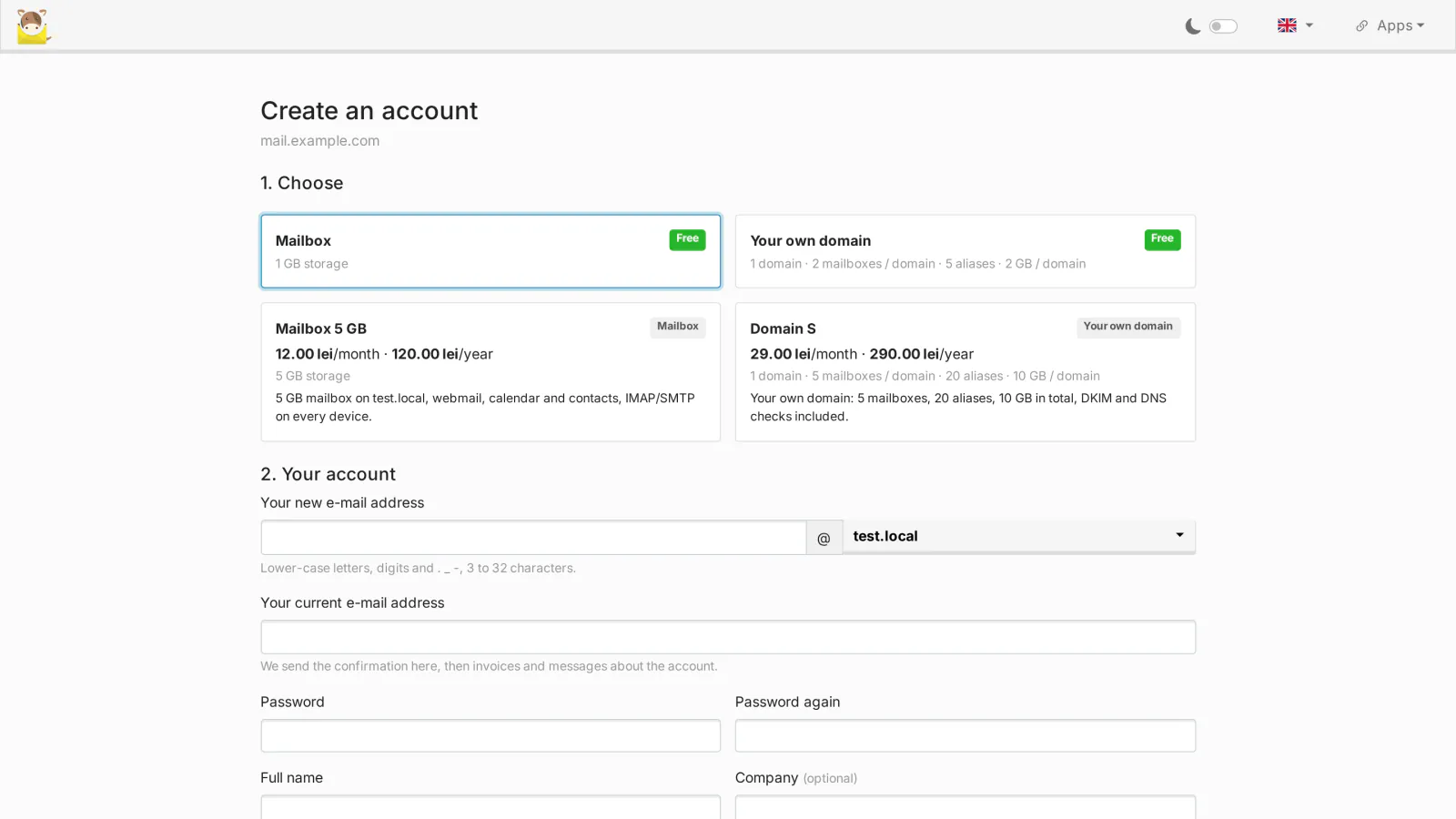
mailcow-dockerized has no registration page: every mailbox and every domain is created by an administrator. Sign-up for mailcow adds a public registration page to your own mailcow, so visitors can create their account themselves, within the limits you set, and only after they confirm their e-mail address. It ships in the mailcow Toolkit package (0.4.0 or newer) and has its own license.
What it does
A registration page on your mailcow
- A public page,
/mlw-signup/, on the mailcow UI and on the webmail host name. While registrations are open, mailcow's sign-in page shows a Create an account link. - You choose what a visitor can get: a mailbox on one of the domains you open for registration, a domain administrator account for the visitor's own domains, or both.
- Mailboxes: name rules (minimum and maximum length), reserved names (postmaster, abuse, admin and the like, plus your own), the free quota and the mailcow mailbox template.
- Domain administrators: a free package (number of domains, mailboxes, aliases and quota per domain, default mailbox quota) and the mailcow domain template.
- Form fields you choose (name, company, phone, country: off, optional or required), a link to your terms that must be accepted; the page is in English or Romanian, following the language chosen in mailcow.
Confirmation, approval and invitations
- The e-mail address is confirmed with a 6-digit code, a link or both; the code or link expires after 1 to 168 hours.
- Optional administrator approval for free registrations, with an e-mail to you for each new registration and an e-mail to the visitor with the decision (and your reason, if you reject it).
- Invitation codes: off, optional or required. A code can be single or multi-use, expire, be bound to an account kind or to a plan, and skip the approval.
- Nothing is created in mailcow before the address is confirmed (and approved, or paid with Cashier for mailcow). The registration keeps only mailcow's hash of the chosen password.
Anti-abuse
- A hidden field and a minimum time to fill in the form stop simple bots.
- A limit of registrations per network address per day, 5 confirmation e-mails per address per day and 5 attempts per code.
- Allowed and blocked e-mail domains, and disposable addresses blocked with the built-in list plus the list MediaLab Works keeps up to date (delivered with a valid license).
- The password must follow mailcow's own password policy.
The new account
- Mailboxes and domain administrators are created with mailcow's own functions, as if an administrator had added them, with your templates and limits.
- A welcome e-mail (with your own text in English and Romanian, if you want) and automatic sign-in in the browser that registered.
- Paid plans, add-ons and the subscription page come with Cashier for mailcow.
The customer's own domains
- A domain administrator adds a domain on My account (
/mlw-signup/account.php, also in the mailcow menu) and proves it with a TXT record:_mlw-verify.<domain>with the valuemlw-verify=<token>shown on the page. - The record is checked on Verify and every 10 minutes for 7 days. Once found, the domain is added to mailcow with the package limits (domains, mailboxes, aliases, quota).
- The page then shows the DNS records the domain needs (MX, SPF, DKIM, DMARC and the recommended ones), computed by the Toolkit's DNS module. The Toolkit's new domain wizard can send the role addresses of a customer domain to the customer, and customer domains are kept out of your own Cloudflare automatic setup.
Without a license
Registrations close: the public page says that registration is not available and the sign-in page no longer shows the link. Existing accounts, mailboxes and domains are never touched.
Requirements
- The mailcow Toolkit package 0.4.0 or newer installed on mailcow-dockerized (Linux,
docker compose, systemd); Sign-up is part of the package. See the mailcow Toolkit guide for the installation. - The server must reach medialab.works over HTTPS (license check).
- mailcow must be able to send e-mail to your visitors (confirmation and welcome e-mails).
- For own domains: the customer must be able to add a TXT record at their DNS provider.
- For paid plans: Cashier for mailcow, with its own license.
Frequently asked
Does a registration create anything in mailcow right away? No. The mailbox or the domain administrator is created only after the address is confirmed and, when you turned it on, approved (or, for a paid plan, paid). Unconfirmed registrations simply expire.
Can visitors use their own domain? Yes, with the domain administrator account kind. The domain is added after the TXT check, with the limits of the package (free package or the paid plan).
What happens when the license ends? New registrations stop. Everything that already exists in mailcow keeps working; a valid license opens the page again.
Where is the data kept?
In mailcow's own database (tables mlw_su_*), so it is part of mailcow's backups. The settings are in the Toolkit's folder on the server.
Licensing
Sign-up for mailcow is open source (GPL-3.0), like mailcow and the Toolkit. What you buy is the subscription for new versions, updates and support for one mailcow server, with its own license key and its own free 30-day trial; the mailcow bundle covers the Toolkit, Sign-up and Cashier with one key. It is PHP and JavaScript, so you receive the complete source code. See section 11 of the EULA.
Sign-up for mailcow is our own code, written by MediaLab Works; it contains no third-party code. It runs inside mailcow-dockerized and creates accounts with mailcow's own functions; mailcow is a separate open-source project (GPL-3.0) by The Infrastructure Company GmbH, see Copyright.