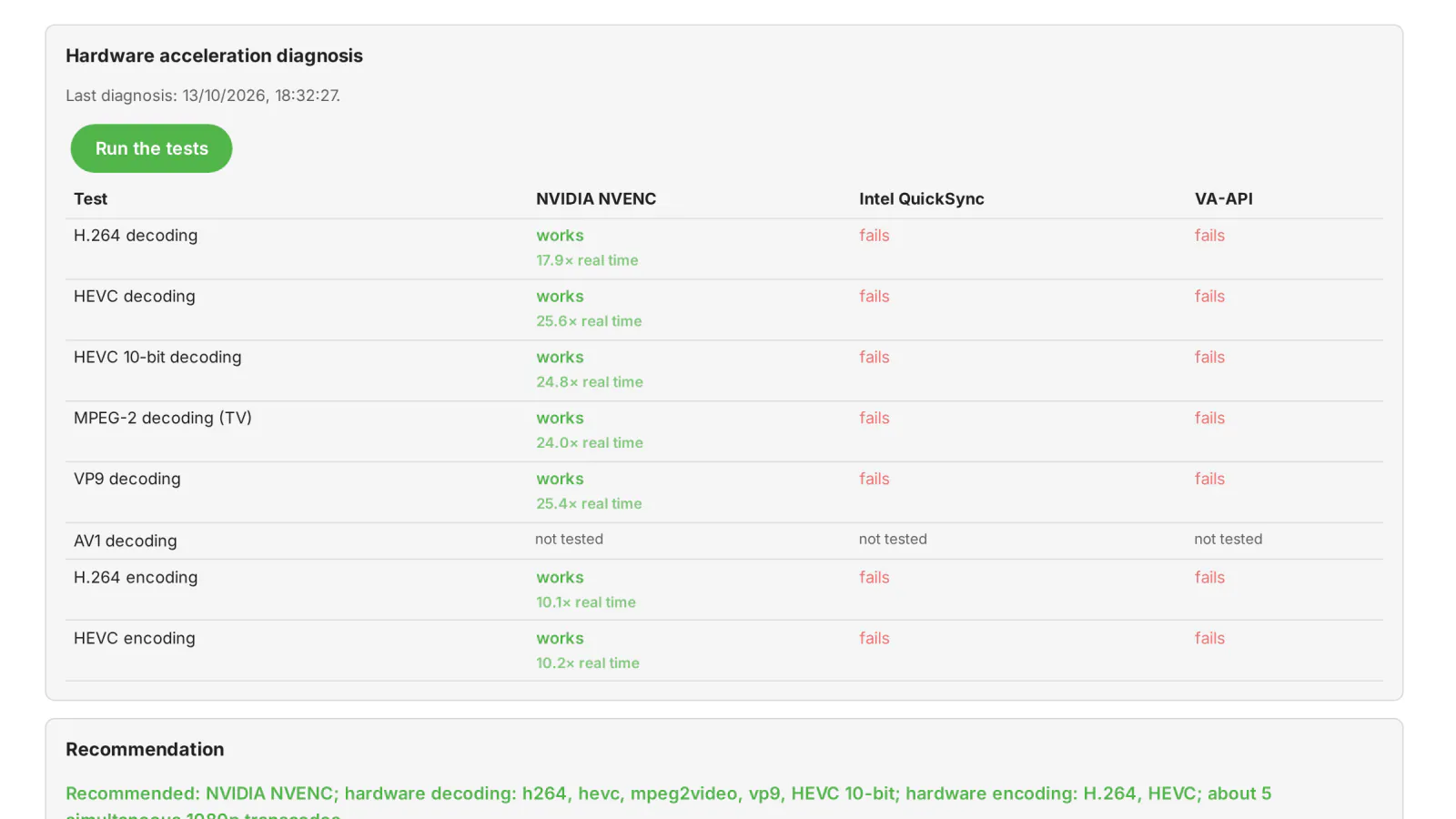
Transcode Doctor shows whether your Emby server can transcode on the graphics card, what stops it when it cannot, and why each playback is transcoded at all.
What it does
- Hardware acceleration diagnosis with Emby's own ffmpeg: checks the NVIDIA card and the
/dev/dridevices (with the permissions of the Emby process), then runs short test transcodes with each method — NVIDIA NVENC, Intel QuickSync and VA-API (Intel / AMD). Each method is tested at decoding H.264, HEVC, HEVC 10-bit, MPEG-2 (TV), VP9 and AV1 and at encoding H.264 and HEVC, with the measured speed. AV1 encoding is not tested, because Emby's ffmpeg cannot test it. The test clips are generated in Emby's cache folder; your media is not touched. - Problems with the exact fix: for example the Emby user missing from the
rendergroup (with the command to run), an NVIDIA card whose driver does not respond, or ffmpeg not found. - Recommendation: the method that works, the card's codecs, an estimate of how many 1080p transcodes can run at the same time, and where to tick them in Emby. The plugin does not change Emby's settings: Emby chooses the detected hardware codecs itself, in Settings → Transcoding (hardware acceleration "Advanced", with the card's codecs ticked).
- Why it transcodes: the recent transcoded playbacks, each with Emby's reasons explained in plain words and what can be done (for example burned-in PGS subtitles, HDR on an SDR screen, the app's bitrate limit). Up to 500 playbacks are kept.
- CPU fallback alert: an entry in Emby's activity log when a video transcode runs on the processor although the last diagnosis found a working hardware method.
- In English and Romanian.
Requirements
- Emby Server 4.10.1 or newer (Linux, Windows or Docker).
- An NVIDIA, Intel or AMD graphics card with its driver: for NVIDIA, the driver with
nvidia-smi; for Intel and AMD, a/dev/drirender device the Emby user can open (usually through therendergroup). In Docker, the device must be passed into the container. Hardware transcoding in Emby itself needs Emby Premiere.
Frequently asked
Why does Emby transcode on the CPU even though my server has a GPU? Often the Emby user has no access to the card, the driver is missing, or the card's codecs are not ticked in Emby's transcoding settings. Transcode Doctor tests the card with Emby's own ffmpeg and tells you which one. See the guide.
Does it change my Emby settings? No. Unlike the Jellyfin version, it only reports: Emby picks the hardware codecs itself, and the panel says where to set them.
What it sends where
- No external contact besides the licensing client. It downloads no test files: sample clips (H.264, HEVC, HEVC 10-bit, MPEG-2, VP9, AV1) are generated locally with the server's bundled ffmpeg, in the server's cache folder (
transcode-doctor/). Your media files are not touched. - Local processes: the server's bundled ffmpeg,
nvidia-smi(only if an NVIDIA card exists), an access check on/dev/dri/renderD*. - The diagnosis runs only when you click the button. Session watching (every 15 s, licensed only) reads the transcoding info of active playbacks; the "fell back to CPU" alert (on by default) only writes to the local activity log.
- The plugin does not change Emby's transcoding settings (it tells you what to tick).
- Plus the licensing client, the same in every plugin: see Licensing and privacy in our plugins.
Stored locally (state/ in the plugin data folder): report.json (last diagnosis: ffmpeg path, GPU, results), history.json (last 500 transcoded playbacks: time, user, app, device, title, transcode reasons, hardware/CPU), synthetic clips in cache.
Never sent: none of the above leaves the server.
Client compatibility
- Watching and alerts are server-side: 🟢 works with any client that triggers a transcode.
- UI: admin page only — Emby Web ✅ (checked visually; no automated end-to-end test).
- Hardware tested: NVIDIA (NVENC) on a real Quadro M2000 ✅. Intel QSV / VA-API: detected and tested by the plugin, ❔ not tested on real hardware. AMD AMF, Apple VideoToolbox, Rockchip: not supported.
- Checks are Linux-oriented (/dev/dri, nvidia-smi,
rendergroup); Windows/macOS: ❔ not tested.
Legend: ✅ verified (end-to-end or on-device test) · 🟢 server-side, works with any client (by design, no client-specific test) · ➖ not applicable · ❔ not tested.
Licensing
One license per Emby server. Monthly, yearly or lifetime, or included in the Emby bundle. Free 30-day trial. The plugin is licensed under our EULA.
Transcode Doctor is our own code, written by MediaLab Works; it contains no third-party code.