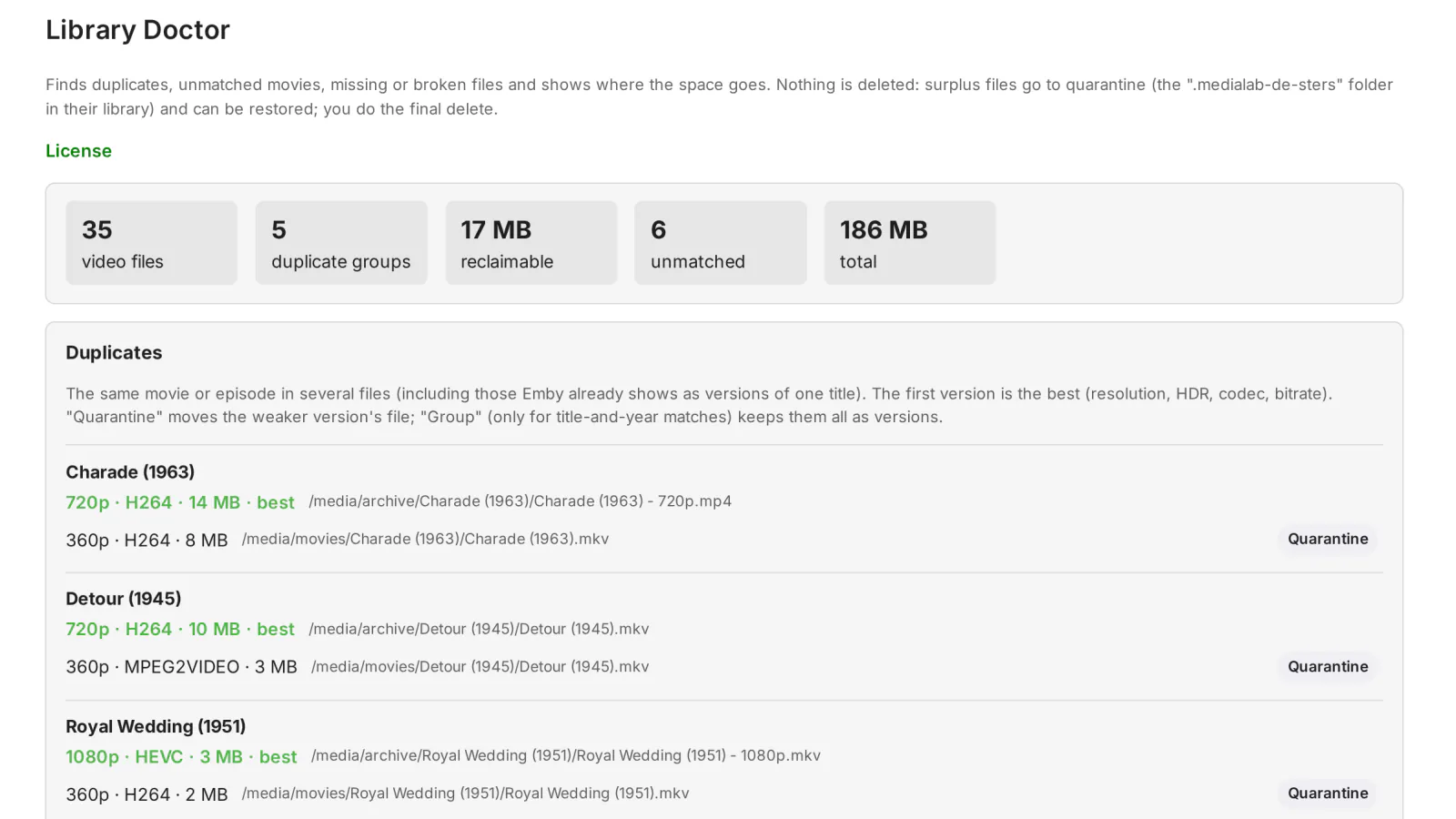
Emby has no report for the problems that pile up in a library: the same movie added twice as two separate titles, movies it never matched, files that went missing, got damaged or were only half copied. Library Doctor finds them, shows what each one costs in disk space and lets you clear them out without ever deleting a file.
What it does
- Duplicates: the same movie or the same episode (same series, season and episode number) in separate items. Movies are matched by their TMDb or IMDb id; movies without either id are matched by their title (ignoring case, accents and punctuation) and year, and those groups are marked by title and year — check, because two different movies can share a title and a year. Each group shows the versions side by side — resolution, HDR, codec, bitrate and size — with the best one first and the space you would reclaim by keeping only that one. Quarantine moves a weaker version out of the way.
- Versions Emby already groups are left alone: files that Emby already shows as versions of one title (the same title with a version choice at playback) are not reported as duplicates; only separate items are.
- Unmatched movies: movies with no metadata id at all, which usually means a wrong title, year or poster and a movie missing from collections and recommendations. Each one links to the movie, where Emby's Identify fixes it.
- Missing, broken or truncated files: a background check of every movie and episode file with the ffprobe and ffmpeg that come with Emby. It reports files that are missing from disk, cannot be read (with the error), have no real video track (only an image, for example a file of random bytes in which ffprobe guesses a picture), have no duration (a broken header), have zero duration, or are truncated: the last 3 seconds of the video are decoded, and a file whose end cannot be decoded is reported as an incomplete download or copy.
- Space report: the total, then the space by library, by resolution (4K, 1080p, 720p, SD) and by video codec, and the 20 largest files that no user has watched.
- Quarantine instead of deletion: see below. The plugin never deletes anything.
- In English and Romanian.
The quarantine: nothing is deleted
When you click Quarantine on a version (and confirm), the plugin moves the video file and the files next to it that share its name — subtitles, .nfo, images such as Movie.srt, Movie.en.srt, Movie.nfo, Movie-poster.jpg — into a folder named .medialab-de-sters (Romanian for “to delete”) at the root of the library folder that holds them, keeping their sub-folders. Because the folder is inside the same library folder, it is normally on the same disk and the move is instant. Emby then rescans the library.
The move is recorded before any file is touched. If a file cannot be moved (for example because of permissions), the files already moved are put back and no copy is left behind in .medialab-de-sters; if putting them back is not possible either, the entry stays in the quarantine list so you can restore it.
The Quarantine list shows every moved title with its original location and size. Restore moves the files back exactly where they were and rescans; it refuses, without touching anything, if a file is both in quarantine and back at its original path. The plugin never overwrites or deletes a file: once you are sure, you delete the .medialab-de-sters folder from disk yourself.
Files outside the library folders, and files already in a .medialab-de-sters folder, are refused.
Requirements
- Emby Server 4.10.1 or newer (Linux, Windows or Docker).
- For the file check: the ffprobe and ffmpeg that come with Emby (nothing to install).
- For the quarantine: the Emby user needs write access to the library folders (to create
.medialab-de-stersat the root of the library folder and to move files out of their folders). In Docker, the media volumes must not be mounted read-only. Without write access all the reports work; only the quarantine cannot move files.
Frequently asked
Can it delete my movies? No. There is no delete function in the plugin. The quarantine only moves files inside the same library folder, and they come back with Restore.
Why is the same movie listed twice in Emby? Emby groups the files of one movie as versions only when they sit in the same folder with matching names. Two files of the same movie in different folders become two items. Library Doctor finds them by their TMDb or IMDb id (or by title and year when they have no id) and lets you quarantine the weaker one. See the guide.
Can it find every damaged file? It finds files that are missing, unreadable, without a real video track or without a duration, and files whose end cannot be decoded. A file cut off very close to its end (for example at about 98%) can still have decodable frames in its last seconds and pass the check, and damage in the middle of a file is not looked for.
What it sends where
- No external contact besides the licensing client. No online metadata lookups: duplicates and unmatched titles are computed from the ids (TMDb/IMDb…) the server already stores.
- Indirectly: after a quarantine move or restore, the plugin starts the regular library scan, which may contact the metadata providers configured on the server (server behavior, not the plugin's).
- The file check (on demand only) runs the server's ffprobe on each movie/episode, locally. No scheduled scans.
- Plus the licensing client, the same in every plugin: see Licensing and privacy in our plugins.
Stored locally:
- Quarantine deletes nothing: the file and its companions (subtitles, nfo, images) are moved to
<library root>/.medialab-de-sters/; permanent deletion is up to you. state/quarantine.json: title, date, original and quarantine paths, size.- File-check results are kept in memory only. The plugin reads from the library whether any user has watched a title (for "largest unwatched"), without storing it.
Client compatibility
- Admin page only: Emby Web ✅. Features run on the server, so clients (apps, TVs) only see the effect (titles moved/grouped).
- Tests: API-level end-to-end (16/16), end-of-file check on 400/400 real files with no false positive; Emby 0.1.2 runs on a production server.
- Limitations: the server needs write access to library folders for quarantine; on Emby 4.10, same-TMDb copies grouped automatically still show as duplicates until you merge them; a truncated
.tscannot be detected (no stored duration).
Legend: ✅ verified (end-to-end or on-device test) · 🟢 server-side, works with any client (by design, no client-specific test) · ➖ not applicable · ❔ not tested.
Licensing
One license per Emby server. Monthly, yearly or lifetime, or included in the Emby bundle. Free 30-day trial. The plugin is licensed under our EULA.
Library Doctor is our own code, written by MediaLab Works; it contains no third-party code.