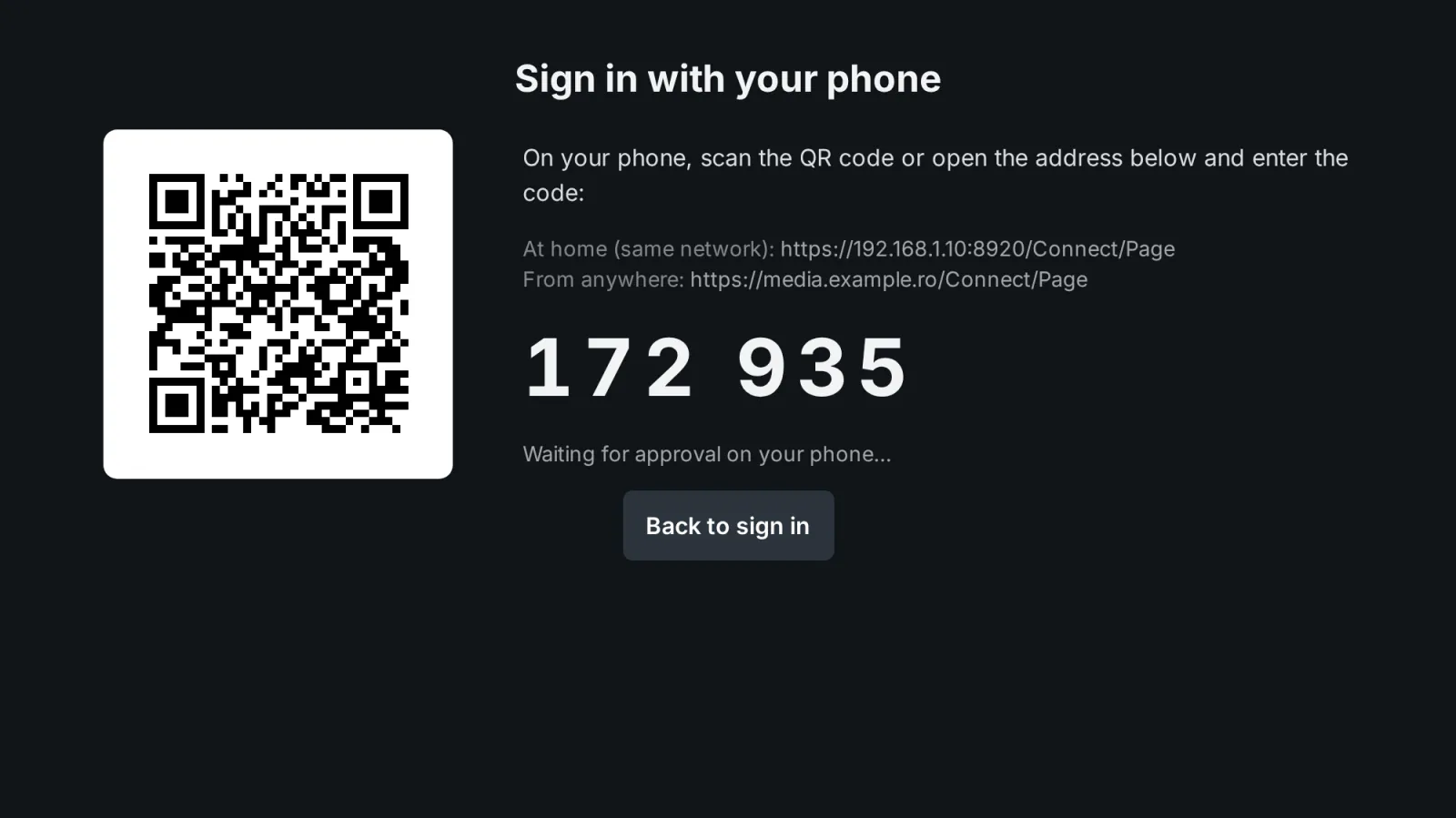
Jellyfin already has Quick Connect: an app on the TV shows a 6-digit code, and a signed-in user approves it somewhere else. Finding where to approve it, deep in the Jellyfin settings on the phone, is the hard part. Quick Connect by MediaLab gives your users a short phone page with a QR code for that, and a code screen for TV browsers.
What it does
- Phone page with a QR code (
/Connect/Pageon your Jellyfin address): it approves the Quick Connect code shown by any Jellyfin app — Android TV, Fire TV, webOS, Tizen, Roku, iOS or Jellyfin Web. The user approves with one tap if Jellyfin is already signed in on the phone, or with username + password (this second way can be turned off). - Screen for TV browsers (
/Connect/Screen): shows the code and a QR code that leads to the phone page; after the approval, the screen signs in to Jellyfin Web by itself. - New account from the phone: with Registration installed, the phone page links to the sign-up page.
- Admin panel in the Jellyfin dashboard: whether Quick Connect is on in Jellyfin (with a button to turn it on), the settings and the recent approvals. In English and Romanian.
No one-time password code, on purpose. Unlike the Emby version, this plugin does not let users type a code in place of their password. A Jellyfin account that depended on such a code would be locked out if the plugin were ever removed. Every sign-in goes through Jellyfin's own Quick Connect, and passwords stay exactly as Jellyfin manages them.
Security
- The codes are those of Jellyfin's own Quick Connect: Jellyfin creates them and they expire by themselves. The plugin only approves them.
- 10 wrong attempts (wrong codes or wrong passwords) from one address within 10 minutes block it for 10 minutes.
- Disabled accounts are refused. Optionally, administrator accounts cannot approve through the phone page.
- The phone and screen pages are served with a strict content security policy and send no referrer.
- Every approval is logged with the user, the address and how it was approved.
Requirements
- Jellyfin Server 12.2 or newer.
- Quick Connect turned on in Jellyfin (Dashboard → General). The plugin page shows its state and can turn it on.
Frequently asked
Can my users sign in on a TV without typing their password? Yes. The Jellyfin app on the TV shows a Quick Connect code; the user scans the QR code or opens the phone page and approves it. See the guide.
Is there a one-time code to type instead of the password, like in the Emby version? No, and that is deliberate: if the plugin were removed, users who relied on that code would be locked out. Jellyfin's Quick Connect already covers the official apps.
What it sends where
- No external service besides the licensing client. QR codes are generated on the server; the screen and phone pages load only the plugin's files.
- After sign-in the TV/browser is sent to the address set by the admin (default: the server's web UI). The session token is written to browser storage before the redirect, never put in the URL. Local/external addresses are HTTPS only.
- Uses Jellyfin's native Quick Connect; no files modified.
- Plus the licensing client, the same in every plugin: see Licensing and privacy in our plugins.
Stored locally:
- Pending codes — memory only.
state/approvals.json: last 500 approvals (time, user, device, app, IP, method).
Never sent: passwords, tokens — nothing goes to third parties.
Client compatibility
- Screen + phone (QR, approve from the phone): browsers — Jellyfin Web on a TV, desktop, MediaLab TV. ✅ emulated (Chrome with a Philips NETTV User-Agent; 25/25); ❔ not tested on physical TVs.
- Any app with native Quick Connect (Android TV, Fire TV, webOS, Tizen, Roku, iOS/Swiftfin, Jellyfin Web): the phone page approves the code the app shows. ✅ simulated via API (client "Jellyfin Android TV"); ❔ not tested on real Android TV, Swiftfin, Findroid, Kodi/JellyCon, Infuse, Streamyfin. Requires Quick Connect enabled in the Dashboard. No one-time codes on Jellyfin (safety decision).
- Automatic sign-in after new account + payment: with Registration and Cashier; off by default.
Legend: ✅ verified (end-to-end or on-device test) · 🟢 server-side, works with any client (by design, no client-specific test) · ➖ not applicable · ❔ not tested.
Licensing
The plugin is open source (GPL-3.0). The ready-to-install builds are public, like the source code. What you buy is the subscription: the license to use the plugin on one Jellyfin server, the updates your plan includes, and support: every update while the subscription is active, through your private plugin repository, and help when something does not work. The plugin checks the subscription key once a day; without a valid subscription it stops until you renew (nothing is deleted). Monthly, yearly or lifetime (lifetime includes one year of updates), or included in the Jellyfin bundle. 30-day free trial.
Source code. For every release, the complete corresponding source code is public, next to the build, in the changelog, and also in your account (Account → Licenses, Source code); each archive contains the full GPL-3.0 text (LICENSE). If you need the source of a version you can no longer download, ask us and we send it. See section 10 of the EULA.
Our own code, written by MediaLab Works. Third-party code: the QR code generator is based on the QR Code generator library by Project Nayuki (MIT license).