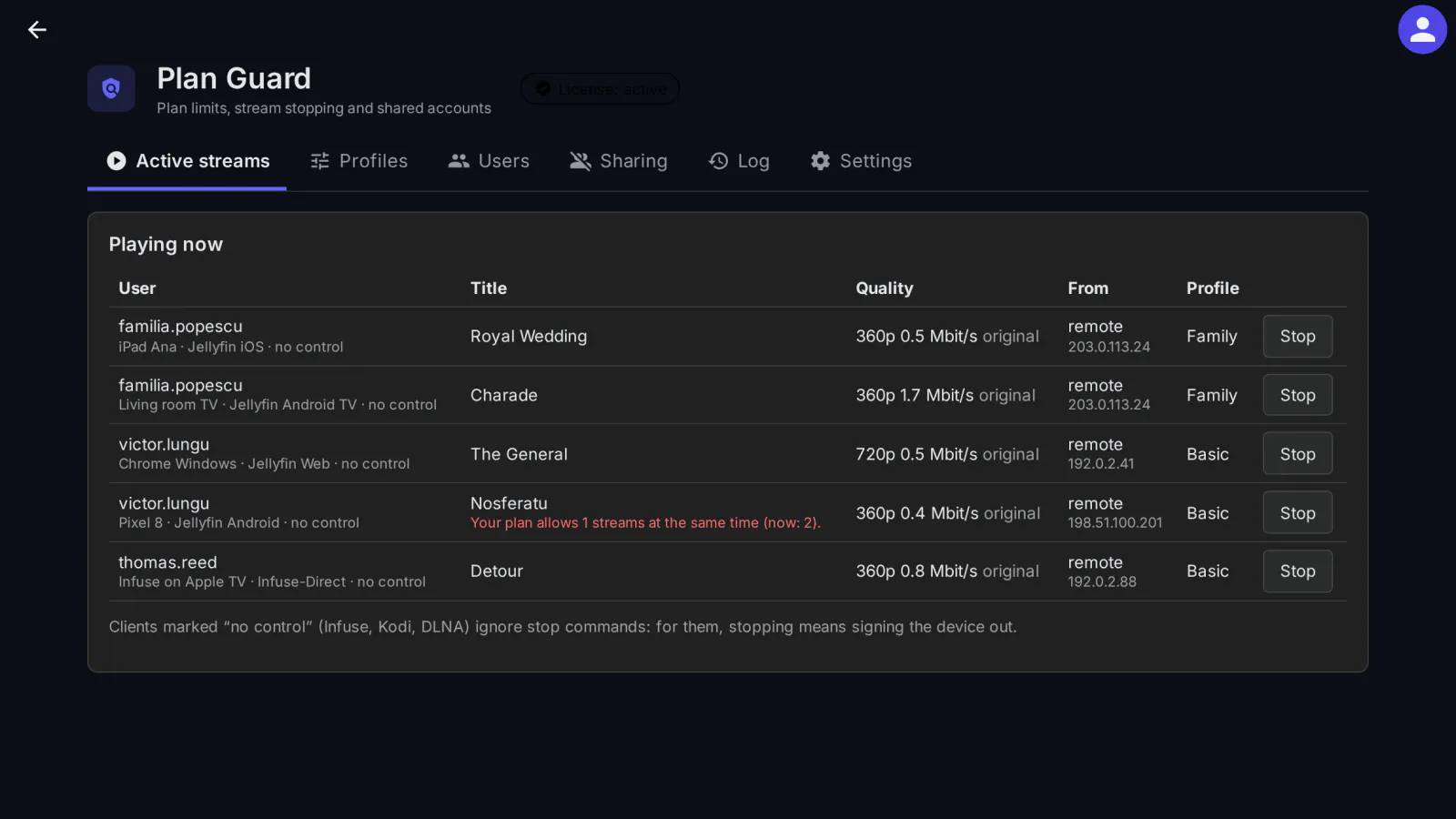
Plan Guard sets streaming limits per user or per plan on your Jellyfin server, enforces them before and while people watch, and detects accounts that are shared with other people, for example a paid account used in several homes at once. Jellyfin has no limit on simultaneous streams of its own; Plan Guard adds one.
What it does
- Limit profiles: simultaneous streams, quality at home and away from home (bitrate), maximum resolution, whether video conversion (transcoding) is allowed and whether 4K sources may be converted, and how many devices an account may use in 30 days. Each user gets a profile, or the default profile for everyone else. Administrators are never limited.
- Before playback starts: above the stream limit, a new playback is refused, and the quality requested is capped at the profile's bitrate for home or away. The remote bitrate and the video conversion setting are also written into each user's own Jellyfin policy.
- During playback: a playback that breaks the profile gets a message, then a stop command, then its transcode is ended on the server, and finally the device is signed out. Optionally, the device is also blocked for that user.
- Hard to get around (from version 0.1.2): the stream limit counts the real playback requests per sign-in and title, including direct file, download and HLS requests, so a second sign-in with the same device or a player that does not report playback no longer gets around it. The quality cap also applies to direct requests. You can treat every client as away from home, and a client without an address counts as away from home.
- Shared-account detection: a trust score per account over the last 30 days, from simultaneous playback on different networks, "impossible travel", too many networks in one day, too many devices and new devices. By default it only notifies; you can also message the user, force a new sign-in or block the newest device.
- Works with Cashier: subscribers get the profile linked to their paid plan, and Plan Guard takes over stopping playback.
- Admin page: active streams with a Stop button (with an optional message), profiles, users, shared accounts and a log of every action. Shared-account alerts also go to the Jellyfin activity log.
Client compatibility
The stream limit and the bitrate are also written into Jellyfin's own user settings, so they apply to every client. Not every player obeys a stop command, so Plan Guard uses what each one supports:
- Jellyfin Web (tested end to end): an extra playback is refused before it starts, Stop is obeyed, and a 10 Mbit/s source is transcoded to 1.6 Mbit/s under a 2 Mbit/s profile.
- Players without remote control, such as Infuse, Kodi and DLNA, ignore stop commands: for them, stopping means signing the device out (the user has to sign in again on that device). You can turn this off in the settings. This follows from how these players work; it has not been tested on the real apps yet.
- If a player keeps playing after the stop command, Plan Guard ends its transcode on the server, then signs the device out.
- The stream limit is checked when playback starts, also for players that skip Jellyfin's playback info request and ask for the stream directly.
The native apps (Android, Android TV, Swiftfin, Findroid, Kodi/JellyCon, Infuse, Streamyfin) have not been tested yet; the list of how each one reacts will be added after testing.
What it sends where
Nothing about your users leaves your server, and locations are looked up locally. Plan Guard downloads the free DB-IP Lite City and ASN databases from download.db-ip.com, and again at start-up once they are older than 35 days; it does so only while shared-account detection is on (it is on by default) and when it cannot reuse a location database already kept by Access Log or Security Notifications. Apart from that, only the license check reaches medialab.works. On your server, Plan Guard keeps the accesses per session (user, device, IP, approximate location) for 31 days, and a log of its actions.
Full details for every product, including what stays on your server: Licensing, privacy and compatibility.
IP Geolocation by DB-IP. The DB-IP Lite databases are licensed under CC BY 4.0.
Requirements
- For now medialab Server (the MediaLab variant of Jellyfin 12.2). The current build does not load in the official Jellyfin 12.2 Docker image (the server's API stops answering); a build verified on the official Docker image and Debian package will follow, and until then the plugin stays "coming soon".
- Optional: Cashier, for limits profiles per paid plan.
Limits
- Resolution and video conversion are checked after playback starts (message, then stop); only the stream limit and the bitrate are applied before it starts.
- Mobile networks, VPNs and travel can look like sharing, so the default action for shared accounts is a notification only.
Licensing
The plugin is open source (GPL-3.0). The ready-to-install builds are public, like the source code. What you buy is the subscription: the license to use the plugin on one Jellyfin server, the updates your plan includes, and support: every update while the subscription is active, through your private plugin repository, and help when something does not work. The plugin checks the subscription key once a day; without a valid subscription it stops until you renew (nothing is deleted). Monthly, yearly or lifetime (lifetime includes one year of updates), or included in the Jellyfin bundle. 30-day free trial.
Source code. For every release, the complete corresponding source code is public, next to the build, in the changelog, and also in your account (Account → Licenses, Source code); each archive contains the full GPL-3.0 text (LICENSE). If you need the source of a version you can no longer download, ask us and we send it. See section 10 of the EULA.
Our own code, written by MediaLab Works; it contains no third-party code. The reader for the location database files is our own implementation, written from the public MaxMind DB format specification. The location data comes from DB-IP and is downloaded by your server, not shipped in the plugin.