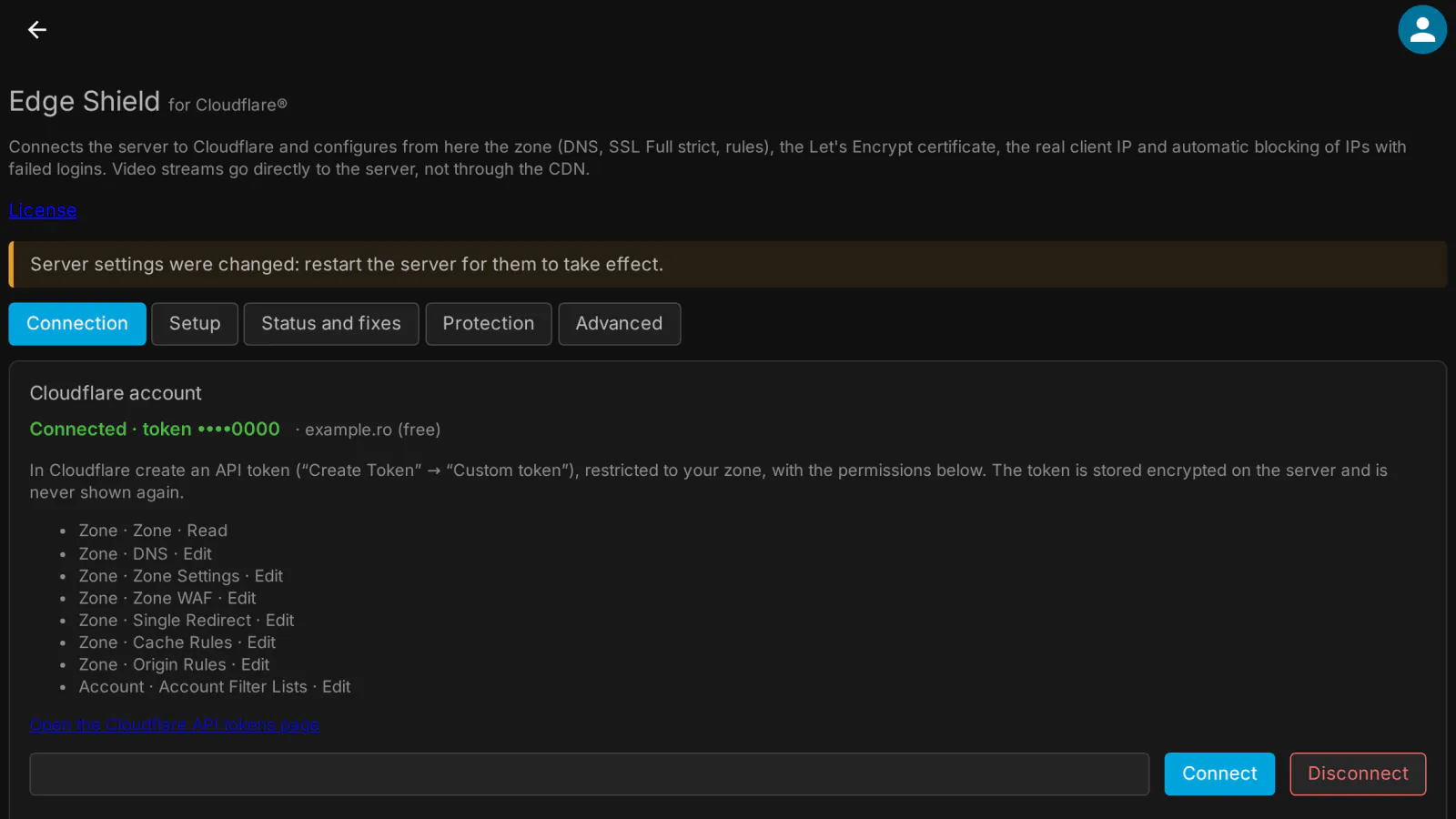
Putting a Jellyfin server behind Cloudflare usually means a dozen manual steps in two places, and an easy mistake: sending video through the Cloudflare CDN, which the Cloudflare terms for Free, Pro and Business plans do not allow. Edge Shield for Cloudflare® does the whole setup from the Jellyfin dashboard, with your own Cloudflare API token, and keeps the video streams going straight to your server.
What it does
- Connection: an API token restricted to your zone, stored encrypted (AES-256-GCM) on the server and never shown in the browser again; zone choice and a check of every permission the token needs.
- "Stream offload" (recommended mode): the app host (for example
media.example.com) goes through the Cloudflare proxy for the web interface, the API and the sign-in, while video, audio and download requests are redirected (307) to a streaming host (for exampledirect.example.com) that is "DNS only" and goes straight to your server. A "DNS only" mode is there for anyone who does not want the proxy. - DNS: the A / AAAA records of both names, with the public IP detected and kept up to date automatically (DDNS).
- TLS in Cloudflare: SSL Full (strict), Always Use HTTPS, minimum TLS version, TLS 1.3, optional HSTS.
- Let's Encrypt certificate for both names through ACME DNS-01 (with the same token, no port 80 needed), renewed automatically 30 days before it expires and set in Jellyfin as a
.pfxfile. - Cloudflare rules that fit the Free plan: the stream redirect, no caching of media paths, the block list, blocking of client-sent IP headers, allowed countries, a login rate limit and the origin port (for example when your router uses 2096 outside). Your own rules stay untouched; Remove the Edge Shield rules deletes only what the plugin created.
- Real client IP: the Cloudflare IP ranges are written to Jellyfin's known proxies and refreshed daily, so Jellyfin sees the visitor's address and cannot be shown a fake one.
- The streaming host accepts media paths only: any other request on that name gets 403, and blocked IPs are refused by Jellyfin itself too, also on the direct host.
- Dynamic protection: an IP with too many failed sign-ins (5 in 10 minutes by default) goes into the Cloudflare list
medialab_blockedand is blocked at the edge for 24 hours, ×4 on every repeat (at most 30 days); entries expire by themselves. Allowlist, manual block and unblock, and a timed Under Attack switch that turns itself off. - Status and fixes: every point checked, with a Fix button per row and Fix everything; the firewall commands to restrict the port are shown, ready to copy.
- In English and Romanian.
What it sends where
- To Cloudflare, through its API and with your own token: the zone settings, the DNS records (with your server's public IP), the rules, and the IP addresses to block. The comment of a block-list entry holds the expiry time and the reason (the number of failed sign-ins, or "manual" with the note you wrote for a manual block). Since 0.1.1 the attempted user name is no longer sent to Cloudflare: it stays on your server only, in the block list and the log of the plugin page.
- To find your public IP (DDNS), the server reads
https://www.cloudflare.com/cdn-cgi/trace; the list of Cloudflare IP ranges is read daily from the public Cloudflare API. - To Let's Encrypt: the certificate request for your two host names (and the e-mail address, if you enter one). The private key is created on your server and never leaves it.
- The token is stored only encrypted on your server and is never sent to the browser.
- Nothing goes to medialab.works except the license check.
Full details for every product, including what stays on your server: Licensing, privacy and compatibility.
Client compatibility
Edge Shield works at the server and network level, so it applies to every app. What has been verified so far:
- Jellyfin Web and medialab Server: real playback through "stream offload", with no video bytes through Cloudflare.
- Jellyfin apps (Android, Android TV, Swiftfin, Findroid, Kodi/JellyCon, Infuse, Streamyfin) and TV browsers: not tested yet. In "stream offload" mode an app must follow the 307 redirect for media; if one does not, use the "DNS only" mode.
- Edge Shield has been checked against a simulator of the Cloudflare API; the check against the real Cloudflare API is still in progress.
Requirements
- Jellyfin Server 12.2 or newer.
- A Cloudflare account with your domain's zone in it; the Free plan is enough.
- A Cloudflare API token ("Custom token", restricted to your zone) with: Zone · Zone · Read, Zone · DNS · Edit, Zone · Zone Settings · Edit, Zone · SSL and Certificates · Edit, Zone · Zone WAF · Edit, Zone · Single Redirect · Edit, Zone · Cache Rules · Edit, Zone · Origin Rules · Edit, Account · Account Filter Lists · Edit. The plugin page lists them and checks them.
- For "stream offload": HTTPS ports forwarded from your router to Jellyfin for the app host and for the streaming host.
Limits
- The streaming host is "DNS only", so your server's public IP is visible to anyone who looks it up. On it, Jellyfin answers only media requests, which still need a valid Jellyfin token.
- Under Attack asks every visitor for a JavaScript check: native apps (Android TV, Roku, iOS, Kodi…) cannot pass it and will not connect while it is on. Use it only during an attack, briefly.
- No Cloudflare Tunnel and no Origin CA certificate in this version: both would send video through Cloudflare or need a certificate that browsers do not trust on the direct host.
- Jellyfin reads its network settings at start-up: the certificate, HTTPS and the Cloudflare ranges in the known proxies take effect after you restart Jellyfin.
Licensing
The plugin is open source (GPL-3.0). The ready-to-install builds are public, like the source code. What you buy is the subscription: the license to use the plugin on one Jellyfin server, the updates your plan includes, and support: every update while the subscription is active, through your private plugin repository, and help when something does not work. The plugin checks the subscription key once a day; without a valid subscription it stops until you renew (nothing is deleted). Monthly, yearly or lifetime (lifetime includes one year of updates), or included in the Jellyfin bundle. 30-day free trial.
Source code. For every release, the complete corresponding source code is public, next to the build, in the changelog, and also in your account (Account → Licenses, Source code); each archive contains the full GPL-3.0 text (LICENSE). If you need the source of a version you can no longer download, ask us and we send it. See section 10 of the EULA.
Our own code, written from scratch by MediaLab Works; it contains no third-party code. Cloudflare is a registered trademark of Cloudflare, Inc.; Edge Shield is not affiliated with or endorsed by Cloudflare.