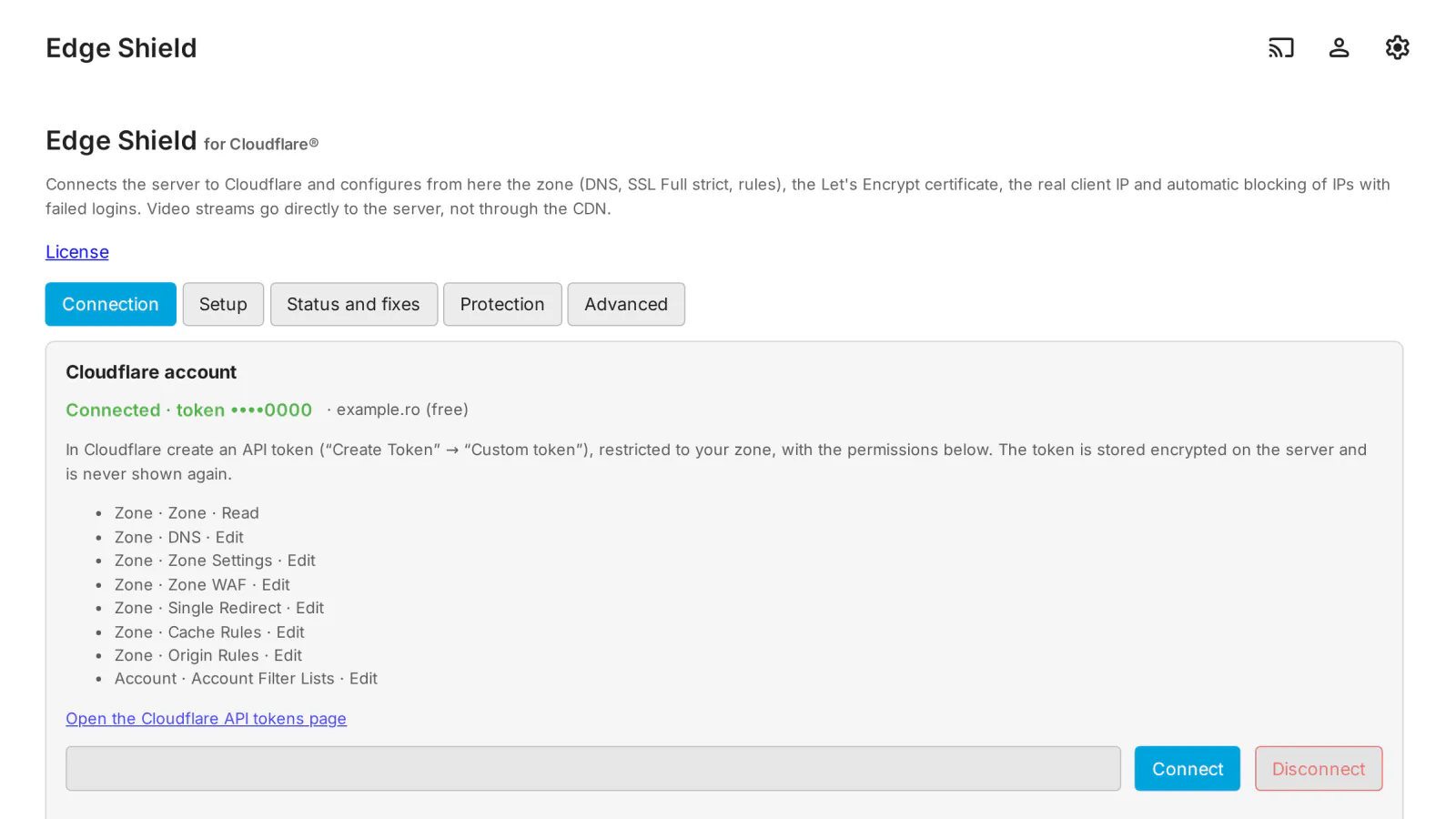
Putting an Emby server behind Cloudflare usually means a dozen manual steps in two places, and an easy mistake: sending video through the Cloudflare CDN, which the Cloudflare terms for Free, Pro and Business plans do not allow. Edge Shield for Cloudflare® does the whole setup from the Emby dashboard, with your own Cloudflare API token, and keeps the video streams going straight to your server.
What it does
- Connection: an API token restricted to your zone, stored encrypted (AES-256-GCM) on the server and never shown in the browser again; zone choice and a check of every permission the token needs.
- "Stream offload" (recommended mode): the app host (for example
media.example.com) goes through the Cloudflare proxy for the web interface, the API and the sign-in, while video, audio and download requests are redirected (307) to a streaming host (for exampledirect.example.com) that is "DNS only" and goes straight to your server. A "DNS only" mode is there for anyone who does not want the proxy. - DNS: the A / AAAA records of both names, with the public IP detected and kept up to date automatically (DDNS).
- TLS in Cloudflare: SSL Full (strict), Always Use HTTPS, minimum TLS version, TLS 1.3, optional HSTS.
- Let's Encrypt certificate for both names through ACME DNS-01 (with the same token, no port 80 needed), renewed automatically 30 days before it expires and set in Emby as a
.pfxfile. - Cloudflare rules that fit the Free plan: the stream redirect, no caching of media paths, the block list, blocking of client-sent IP headers, allowed countries, a login rate limit and the origin port (for example when your router uses 2096 outside). Your own rules stay untouched; Remove the Edge Shield rules deletes only what the plugin created.
- Real client IP: Emby is set to read the forwarded address, and a Cloudflare rule blocks requests that bring their own IP headers, so Emby cannot be shown a fake address.
- Dynamic protection: an IP with too many failed sign-ins (5 in 10 minutes by default) goes into the Cloudflare list
medialab_blockedand is blocked at the edge for 24 hours, ×4 on every repeat (at most 30 days); entries expire by themselves. Allowlist, manual block and unblock, and a timed Under Attack switch that turns itself off. - Status and fixes: every point checked, with a Fix button per row and Fix everything; the firewall commands to restrict the port are shown, ready to copy.
- In English and Romanian.
What it sends where
- To Cloudflare, through its API and with your own token: the zone settings, the DNS records (with your server's public IP), the rules, and the IP addresses to block. The comment of a block-list entry holds the expiry time and the reason (the number of failed sign-ins, or "manual" with the note you wrote for a manual block). Since 0.1.1 the attempted user name is no longer sent to Cloudflare: it stays on your server only, in the block list and the log of the plugin page.
- To find your public IP (DDNS), the server reads
https://www.cloudflare.com/cdn-cgi/trace; the list of Cloudflare IP ranges is read daily from the public Cloudflare API. - To Let's Encrypt: the certificate request for your two host names (and the e-mail address, if you enter one). The private key is created on your server and never leaves it.
- The token is stored only encrypted on your server and is never sent to the browser.
- Nothing goes to medialab.works except the license check.
Full details for every product, including what stays on your server: Licensing, privacy and compatibility.
Client compatibility
Edge Shield works at the server and network level, so it applies to every app. What has been verified so far:
- Emby Web: real playback through "stream offload", with no video bytes through Cloudflare; the admin page on desktop and on a phone.
- Emby apps (Android, iOS, Android TV, Samsung, LG, Roku, Apple TV): not tested yet. In "stream offload" mode an app must follow the 307 redirect for media; if one does not, use the "DNS only" mode.
- Edge Shield has been checked against a simulator of the Cloudflare API; the check against the real Cloudflare API is still in progress.
Requirements
- Emby Server 4.10.1 or newer (Linux, Windows or Docker).
- A Cloudflare account with your domain's zone in it; the Free plan is enough.
- A Cloudflare API token ("Custom token", restricted to your zone) with: Zone · Zone · Read, Zone · DNS · Edit, Zone · Zone Settings · Edit, Zone · SSL and Certificates · Edit, Zone · Zone WAF · Edit, Zone · Single Redirect · Edit, Zone · Cache Rules · Edit, Zone · Origin Rules · Edit, Account · Account Filter Lists · Edit. The plugin page lists them and checks them.
- For "stream offload": HTTPS ports forwarded from your router to Emby for the app host and for the streaming host.
Limits
- The streaming host is "DNS only", so your server's public IP is visible to anyone who looks it up. Streams still need a valid Emby token; Emby offers plugins no way to filter requests by host, so on Emby the streaming host is protected by Emby's own sign-in lockout and by the failed sign-in count (the IP is still blocked on the app host).
- Under Attack asks every visitor for a JavaScript check: native apps (Android TV, Roku, iOS, Kodi…) cannot pass it and will not connect while it is on. Use it only during an attack, briefly.
- No Cloudflare Tunnel and no Origin CA certificate in this version: both would send video through Cloudflare or need a certificate that browsers do not trust on the direct host.
- Server settings that Edge Shield changes (HTTPS, certificate, forwarded address) take effect after you restart Emby Server.
Licensing
One license per Emby server. Monthly, yearly or lifetime, or included in the Emby bundle. Free 30-day trial. The plugin is licensed under our EULA.
Edge Shield is our own code, written from scratch by MediaLab Works; it contains no third-party code and uses only .NET and Emby. Cloudflare is a registered trademark of Cloudflare, Inc.; Edge Shield is not affiliated with or endorsed by Cloudflare.